What does a music teacher need from a music stand?
A teacher turns pages for someone else, marks them up in a different color, and has fifteen pieces in play at a time. The lesson is thirty minutes long, and none of it should go to finding the page.
Teachers also hand pieces to students who practice alone. What they play at home is invisible, and tempo is the best measure there is.
How does SheetScroll hold a studio library?
- Open anything: PDFs, photos of paper music, MusicXML, MuseScore, Guitar Pro, MIDI, ABC, MEI, Humdrum, chord charts and text tabs. Your own arrangements from a notation program open too.
- Bring a library: a library from another reader comes across with titles, tags and setlists.
- Setlists: one for each student, or one for a recital. A recital of six plays through with nothing on screen but the music.
- Free music: over 8,000 public-domain scores are in the app.
SheetScroll keeps its own copy and never changes the original. The library stays on the device. Optional sync uses your own iCloud Drive, Google Drive or a synced folder, end-to-end encrypted.
How do you mark up a piece for a lesson?
Use the pencil, the highlighter, fingerings and the other symbols. Each mark stays with its bar in every view, so a fingering you wrote in two-page view is still there in half-page view.
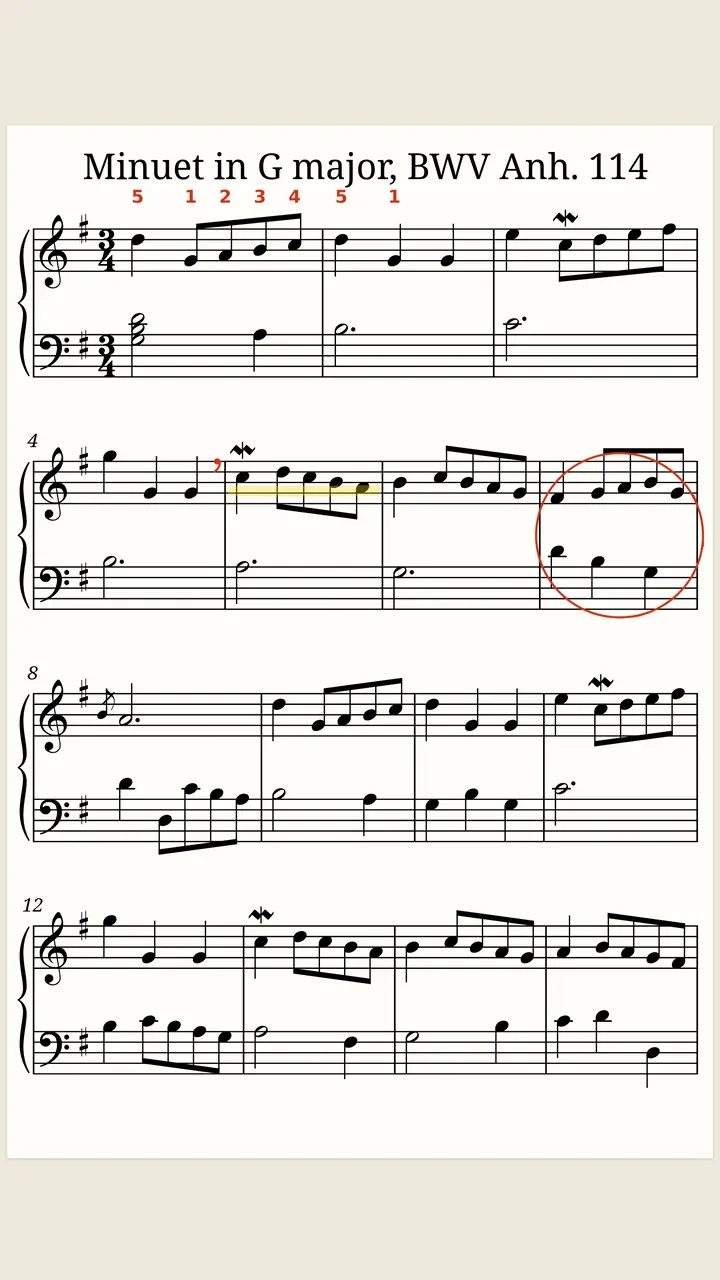
Marking is free. You can mark up a piece before the lesson and open it in the lesson already marked.
What do students get from practice that listens?
With Pro, the page follows the student. It turns, loops the hard bars and follows one hand at a time. It also keeps a tempo history, so a student can come to the next lesson with a record of the week.
Ask students to show you the history at the start of the lesson, and you will see which passages got the week.
SheetScroll has no accounts, so a student's library and practice history stay on their own device.
What about a group class?
Play together lets one device listen while everyone else's pages turn with it over Wi-Fi. In a small ensemble class, the teacher's device can lead while students follow on their own copies. Only bar positions are sent, encrypted. Play together is part of Pro.
What are some tips for the studio?
- Keep a tablet on the piano's music desk for your own copy, and let the student use theirs.
- Use a Bluetooth page-turn pedal to turn pages for a student without leaning over.
- For digital pianos, connect over USB or Bluetooth MIDI. SheetScroll follows the notes themselves.
- Start new students with a free course; the pieces listen and turn without Pro.
What is free for teachers, and what is Pro?
Free: the reader, every format, annotations, setlists and the eight courses. Pro: listening, automatic turns, loops, hands separately, tempo history and Play together, at $29.99 a year, $5.99 a month or $79.99 once.
Questions
Can I mark up a piece before the lesson?
Yes. The pencil, highlighter, fingerings and symbols are free, and they stay with their bars in every view.
Can I see a student's progress?
Tempo history is on the student's own device. SheetScroll has no accounts, so a student can show you the history in the lesson.
Can I run a recital from a setlist?
Yes. Put the pieces in order, and each one opens and listens by itself. Setlists are free.
Does it open my own arrangements?
Yes, if you save them as PDFs, MusicXML, MuseScore or any of the other supported formats.
Can I use it in a group class?
Yes. Play together lets one device lead and others follow over one Wi-Fi network. It is part of Pro.
Related
- StudentsFree courses, free sheet music, loops, hands-separately practice and tempo history. A sheet music app for students that listens and turns the page.
- BeginnersEight free courses for piano, guitar, violin, cello, flute, clarinet, sax and trumpet. The pieces listen and turn the page as you play, with no Pro needed.
- PianistsA sheet music app for pianists: it listens through the mic or a digital piano over MIDI and turns the page two beats early, never early. Free reader.
- Performers and accompanistsA page turner that is never early, with half-page turns, nothing over the music, a pedal and a swipe, and no network needed. Free reader.
- How long to practiceHow long to practice piano, guitar or violin each day, how to practice well, and what to do when you stop improving, with the research behind it.
- Sight-readingHow to get better at sight-reading: what to check first, keeping the pulse, reading ahead, reading patterns, and a daily practice plan with free music.
- Automatic page turnersEvery way to turn sheet music pages hands-free, from pedals to apps that listen, with the pros and cons of each and how a listening page turner decides.
- Repeats, D.S., D.C. and codaHow to read repeat signs, first and second endings, D.C., D.S., coda and fine in sheet music, with a worked example and how a page turner follows them.
- Opening music filesSheetScroll opens PDFs, photos, MusicXML, MuseScore, Guitar Pro, MIDI, ABC, chord charts and more. How to add them, and pair a scan with a digital copy.
- Digital pianos over MIDIConnect a digital piano by USB or Bluetooth MIDI and SheetScroll follows the notes themselves, with no microphone. Here is how to set it up.
- PianoFifteen free, public-domain piano pieces in teaching order, from three right-hand notes to Burgmüller. They listen and turn pages without Pro.
- Page turning appsSheet music apps that turn pages by listening (SheetScroll, Newzik, Smartleggio) or by face and eye gestures (forScore, MobileSheets, SightTune).