What does a music student need from a music stand?
A student's stand holds a lot: a method book, a piece for the next lesson, a scan of the teacher's copy, an audition excerpt. Money is tight, and a different app for each of them is a bad answer.
Practice is the real job. You play the hard bars twenty times, slow, with one hand, and then at tempo. Every restart is a turn of the page, or a trip back to the start.
You also want proof that it is working. A tempo that climbs week by week is better than a feeling.
What can a student do for free?
- Read any score: PDFs, photos of paper music, MusicXML, MuseScore, Guitar Pro, MIDI, ABC, MEI, Humdrum, chord charts and text tabs.
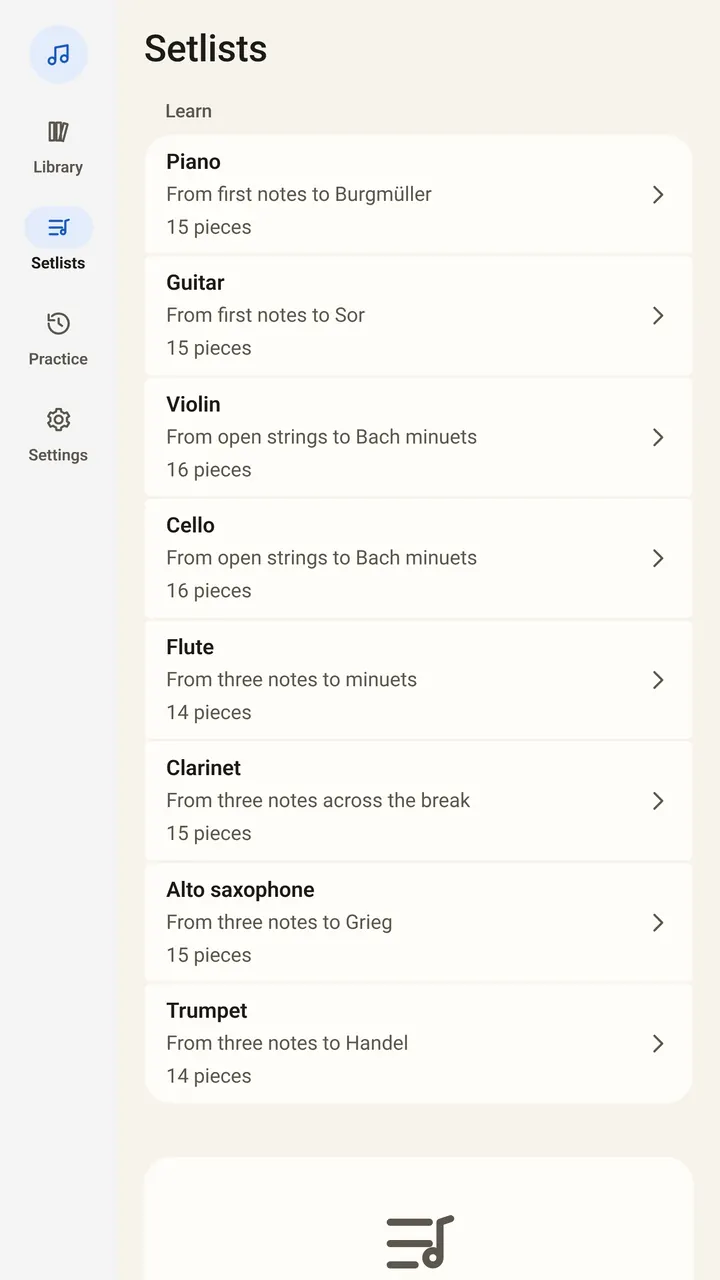
- Take eight courses: piano, guitar, violin, cello, flute, clarinet, saxophone and trumpet, with public-domain pieces in teaching order. They listen and turn without Pro.
- Find free music: over 8,000 public-domain scores in the app.
- Mark it up: pencil, highlighter, fingerings and symbols that stay with their bars.
- Set up your week: setlists for lesson pieces or a recital.
Reading is free forever, and so is the library you build.
How does Pro help practice?
Pro lets SheetScroll listen and turn pages in your own pieces. It also adds the practice tools:
- Loops: repeat the hard bars until they are easy.
- Hands separately: practice one hand and let SheetScroll follow it.
- Tempo history: see how fast you played each week.
- Back with you: stop, go back or drill four bars, and it finds you.
It never turns early. When you are unsure of a passage and it is unsure too, it holds the page and outlines the bars it is choosing between.
How should a student set up?
- Pick a course for your instrument and play the first piece. Check that the page turns when you expect it to.
- Bring your school's PDFs and scans. SheetScroll keeps its own copy and never changes the originals.
- Use a pencil mark for your teacher's notes, so they stay with their bars.
- Put the device at eye level. A cheap clamp or stand is enough.
- Allow the microphone when asked. If you said no, turn it on in the Settings app under SheetScroll.
How do you use it between lessons?
Think of a week as three jobs. First, read the new piece through, slowly, and let the page turn on its own so you never stop to flip it. Second, pick the two hardest bars and loop them. Third, play the whole piece at the tempo you can keep.
Take a pencil to the score as you go. Write the fingering you finally settled on, circle the bar you rushed, and highlight a repeat you missed. The marks are free, and they stay with their bars in every view, so they are there next week.
If you play a digital piano, connect it over USB or Bluetooth MIDI. SheetScroll follows the notes themselves, which is handy in a dorm where you are playing with headphones and the microphone would hear nothing.
What does Pro cost a student?
The yearly plan is $29.99 with the first 2 weeks free, which works out to about $2.50 a month. Monthly is $5.99, and a lifetime purchase is $79.99. Prices are in US dollars and the stores show your local price.
Questions
Is SheetScroll free for students?
The reader is free forever, including every format, setlists and the eight courses. Pro adds listening and automatic turns for your own music.
Which instruments have a free course?
Piano, guitar, violin, cello, flute, clarinet, saxophone and trumpet.
Can I practice hands separately?
Yes, with Pro. SheetScroll follows the hand you are playing.
Where do I find free sheet music?
The app has over 8,000 public-domain scores to get for free. Your own PDFs and scans open as well.
Does it record my practice?
No. Sound is analyzed on the device as it arrives and is never recorded, stored or sent.
Related
- BeginnersEight free courses for piano, guitar, violin, cello, flute, clarinet, sax and trumpet. The pieces listen and turn the page as you play, with no Pro needed.
- TeachersMark up pieces, set up recitals, build a lesson library and give students practice that listens. A sheet music app for music teachers, with a free reader.
- PianistsA sheet music app for pianists: it listens through the mic or a digital piano over MIDI and turns the page two beats early, never early. Free reader.
- String playersA sheet music app that turns the page while you bow. It listens to strings, never turns early and shows your PDF parts as printed. Free reader.
- Wind and brassHands-free page turns for wind and brass players. SheetScroll listens through the mic, turns two beats early, never early, and shows your PDFs as printed.
- PianoFifteen free, public-domain piano pieces in teaching order, from three right-hand notes to Burgmüller. They listen and turn pages without Pro.
- GuitarFifteen free, public-domain classical guitar pieces in order, from strings 1 and 2 to Sor. They listen and turn pages without Pro.
- ViolinSixteen free, public-domain violin pieces in teaching order, from the open D and A strings to Bach-era minuets. They listen and turn pages without Pro.
- Sight-readingHow to get better at sight-reading: what to check first, keeping the pulse, reading ahead, reading patterns, and a daily practice plan with free music.
- How long to practiceHow long to practice piano, guitar or violin each day, how to practice well, and what to do when you stop improving, with the research behind it.
- Automatic page turnersEvery way to turn sheet music pages hands-free, from pedals to apps that listen, with the pros and cons of each and how a listening page turner decides.
- Opening music filesSheetScroll opens PDFs, photos, MusicXML, MuseScore, Guitar Pro, MIDI, ABC, chord charts and more. How to add them, and pair a scan with a digital copy.