What does a beginner need from sheet music?
A beginner has three problems. Reading music is new. Playing and reading at once is harder. And turning a page while you do both is a third job nobody warned you about.
You also want to know you are doing it right. A page that turns by itself when you reach the end tells you that you kept the pace.
What do the free courses include?
- Eight courses: piano, guitar, violin, cello, flute, clarinet, saxophone and trumpet.
- Public-domain pieces, in teaching order, from the first notes.
- Every piece listens and turns the page as you play. This works without Pro.
- No account. Nothing to sign up for before the first note.
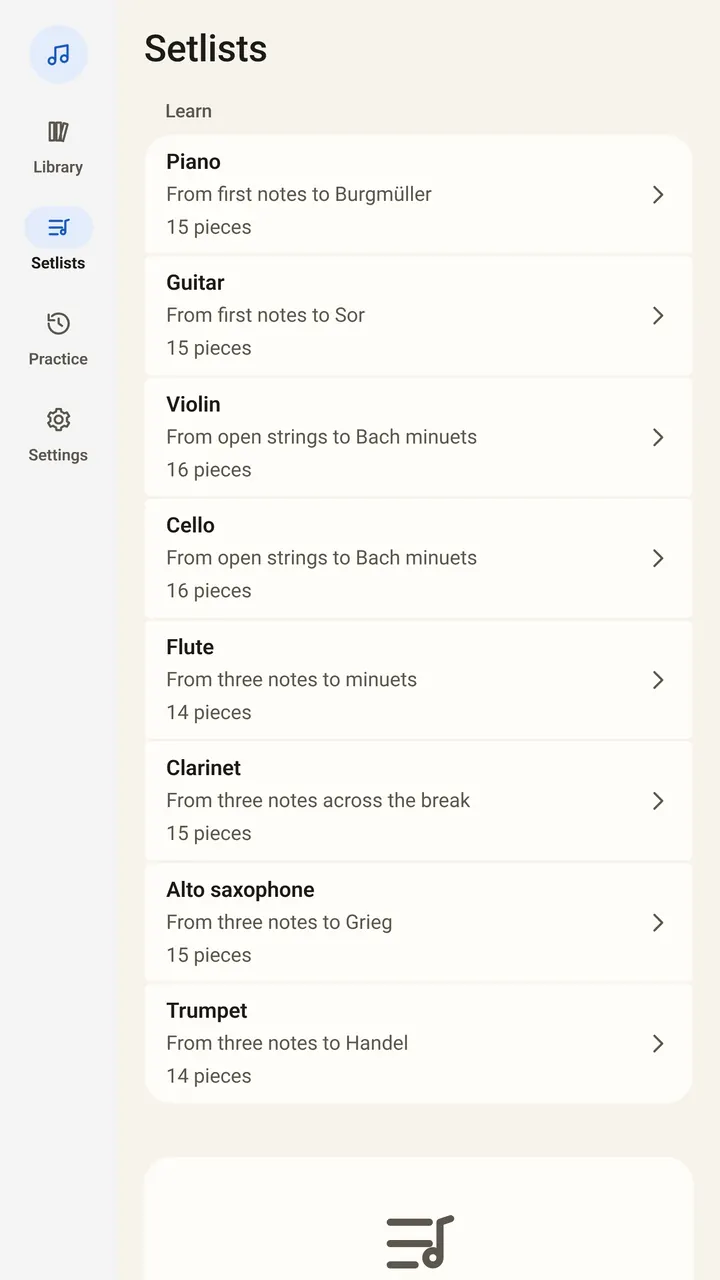
Open the app and tap Learn an instrument in the empty library, or open Setlists. A short demo plays by itself if you want to see how it works first.
What does it feel like on the first day?
- Allow the microphone when asked. The sound is analyzed on the device and never recorded.
- Choose your instrument and open the first piece.
- Play slowly. SheetScroll does not scroll at a set speed. It waits when you stop, slow down or go back.
- If you lose your place, keep playing or tap the bar you are on.
The page turns two beats before its end, as your eyes reach for the next line. A beginner who is a little behind will not be rushed ahead, because it listens for where you are.
How should a beginner set up?
- Piano or keyboard: a tablet on the music desk. A digital piano can connect by USB or Bluetooth MIDI, so it follows the notes themselves.
- Guitar, violin, cello, flute, clarinet, saxophone or trumpet: put the device on a stand where it hears you, not behind you.
- Small screen: a phone works. Try line-by-line or half-page view for short sections.
- No stand? Lean a tablet on a shelf at eye height until you buy one.
What if I make mistakes?
Everyone does, and a beginner makes them all day. SheetScroll is built for it. If you stop to find your fingers, it waits. If you go back to the start of a line, it is back with you within a moment.
When it is not sure where you are, for example in two passages that sound alike, it holds the page and outlines the places it is choosing between. You never get a page that has flipped away from the notes you are still reading.
Short pieces repeat a lot, and repeat signs trip up new readers. SheetScroll follows repeat signs, first and second endings, D.S. and coda, so when you do take the repeat the page goes back with you.
What comes after the courses?
Your own music. The reader is free forever, so you can open any PDF, photo of a paper score or file from a notation program and read it at no cost. The app has over 8,000 public-domain scores to try too.
When you want your own pieces to listen and turn, that is SheetScroll Pro, with a 2-week free trial on the yearly plan ($29.99 a year). Monthly is $5.99, and a lifetime purchase is $79.99. A lapse never takes away the free reader or your library.
Questions
I'm just starting out. Is SheetScroll for me?
Yes. The built-in courses start from your first notes, in teaching order, and turn the page as you play, free.
Do I need to pay to use the courses?
No. The eight courses listen and turn without Pro.
Which instrument should I pick?
The app has courses for piano, guitar, violin, cello, flute, clarinet, saxophone and trumpet. Pick the one you have in your hands.
What if I play too slowly?
SheetScroll moves only when you do. It waits when you slow down, stop or go back.
Do I need to make an account?
No. There is no account, and your music stays on your device.
Related
- StudentsFree courses, free sheet music, loops, hands-separately practice and tempo history. A sheet music app for students that listens and turns the page.
- TeachersMark up pieces, set up recitals, build a lesson library and give students practice that listens. A sheet music app for music teachers, with a free reader.
- PianistsA sheet music app for pianists: it listens through the mic or a digital piano over MIDI and turns the page two beats early, never early. Free reader.
- GuitaristsOpen Guitar Pro files, text tabs, PDFs and chord charts. SheetScroll listens as you play guitar and turns the page, never early. Transpose and set a capo.
- PianoFifteen free, public-domain piano pieces in teaching order, from three right-hand notes to Burgmüller. They listen and turn pages without Pro.
- GuitarFifteen free, public-domain classical guitar pieces in order, from strings 1 and 2 to Sor. They listen and turn pages without Pro.
- ViolinSixteen free, public-domain violin pieces in teaching order, from the open D and A strings to Bach-era minuets. They listen and turn pages without Pro.
- CelloSixteen free, public-domain cello pieces in teaching order, from the four open strings to Bach-era minuets. They listen and turn pages without Pro.
- FluteFourteen free, public-domain flute pieces in teaching order, from the left-hand notes B, A and G to a whole minuet. They listen and turn pages without Pro.
- ClarinetFifteen free, public-domain clarinet pieces in teaching order, from three low notes to a minuet across the break. They listen and turn pages without Pro.
- Alto saxophoneFifteen free, public-domain alto saxophone pieces in teaching order, from B, A and G to Grieg and a whole minuet. They listen and turn pages without Pro.
- TrumpetFourteen free, public-domain trumpet pieces in teaching order, from E, D and C to Handel. They listen and turn pages without Pro.
- Learning as an adultIt is not too late. What to expect in the first months, which instrument is easiest to start, and whether you need a teacher, an app or videos.
- How to read sheet musicLearn to read sheet music: the staff, treble and bass clef, note names, note values, rests, time signatures, key signatures and how to practice reading.
- Where to find free sheet musicWhat public domain means for sheet music, how old a piece must be, why a new edition may not be free, and where to get free scores legally.
- Automatic page turnersEvery way to turn sheet music pages hands-free, from pedals to apps that listen, with the pros and cons of each and how a listening page turner decides.