What does a pianist need from a music stand?
A pianist has no free hand. Every page turn costs a bar: you lift off, reach, and lose the line. On a dense page the turn lands in the middle of a phrase, and the next bar is already gone.
A pianist also has no free foot when the sustain pedal is busy. So a foot page-turner is often not an option, and tapping a screen mid-passage breaks the hold of your hands.
What you want is a stand that follows you, not a clock. It should wait when you slow down for a hard passage, and it should come back with you when you start the bar over.
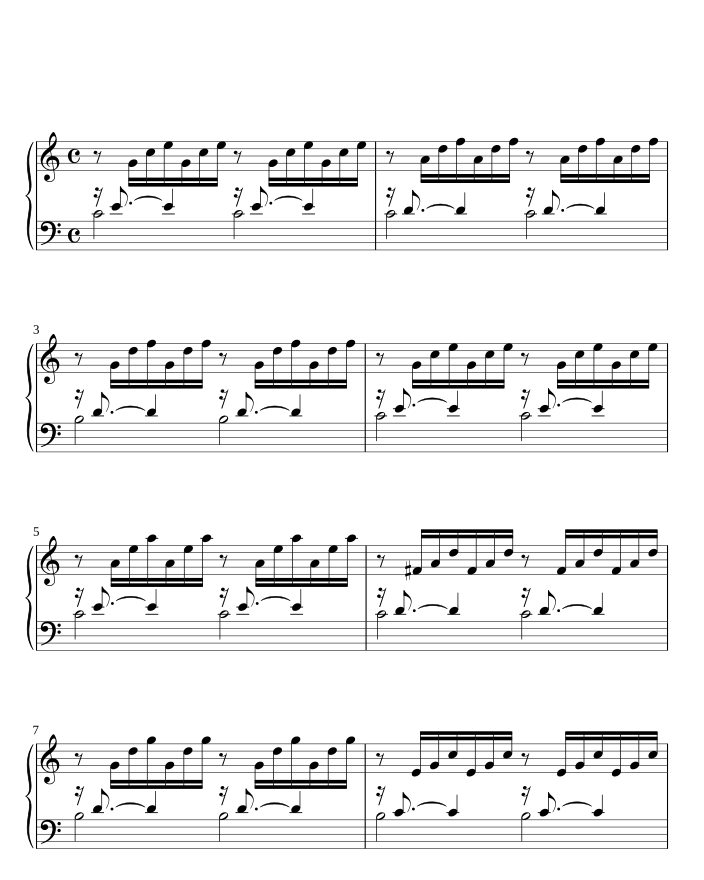
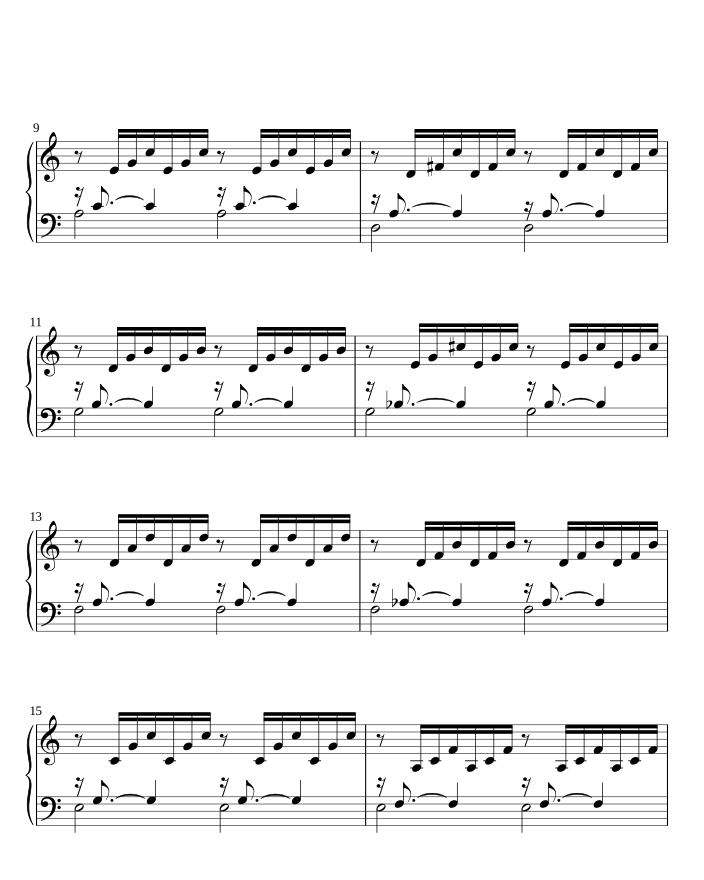
How does SheetScroll turn pages while you play piano?
SheetScroll listens for where you are in the music and turns on time: two beats before the end of the page, as your eyes reach for the next line. It does not scroll at a set speed, so a ritardando or a stop does not run away from you.
- Over MIDI: connect a digital piano by USB or Bluetooth, choose it in Settings > Listening, and SheetScroll reads the notes you press. No microphone is needed.
- Over the microphone: for an acoustic piano, leave the device on the desk and play. Sound is analyzed as it arrives and never recorded.
- Never early: when two passages sound alike, such as a repeated theme, it holds the page and outlines the bars it is choosing between. Keep playing, or tap the bar you are on.
- Repeats followed: repeat signs, first and second endings, D.S. and coda.
- Back with you: stop, go back, or drill four bars, and it finds you again.
Pieces with two staves, and pages in your own PDFs or scans, look exactly as they do on paper. SheetScroll does not redraw them.
What does it do for practice?
Practice is where a pianist spends most hours, so the same listening works there:
- Loop the hard bars and play them again and again.
- Practice hands separately; SheetScroll follows the hand you are playing.
- Watch your tempo history over the weeks.
- Write fingerings above the notes. They stay with their bars in every view.
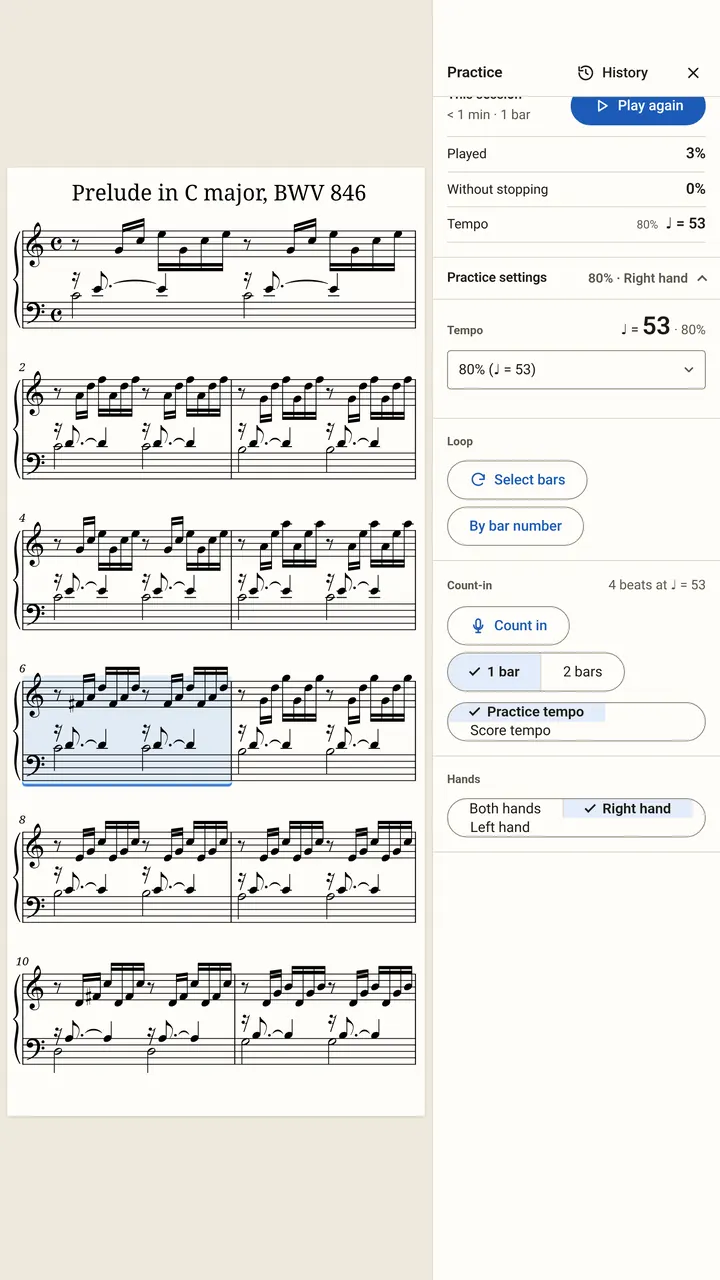
Loops, hands separately and tempo history are Pro. Fingerings and the other markings are free.
How should a pianist set up the stand?
- Put a tablet or a laptop on the music desk. A larger screen can show two pages side by side, so most turns happen on the page you are not reading.
- On a digital piano, use MIDI. A short USB cable is the steadiest; Bluetooth MIDI saves a cable.
- On an acoustic piano, place the device on the desk where it hears you, not behind a closed lid.
- Try half-page turns for pieces with no rest. The next line appears before the old one ends, so there is no blind bar.
- Keep a Bluetooth page-turn pedal as a backup if you have a spare foot. It works alongside listening, and a press always wins.
Open a score and it is already listening. There is nothing to start before you play.
What is free, and what is Pro for pianists?
The reader is free forever: every format, every view, half-page turns, annotations, fingerings, setlists, pedal or tap turns, and the eight free courses, which include piano and listen without Pro.
Pro adds listening to your own scores and automatic turns, plus loops, hands-separately practice and tempo history. It costs $5.99 a month, $29.99 a year (the first 2 weeks free) or $79.99 once.
Questions
Can I use SheetScroll with a digital piano?
Yes. Connect it by USB or Bluetooth MIDI and choose it in Settings > Listening. SheetScroll then follows the notes themselves and needs no microphone. Listening is part of Pro.
Will it turn the page at the wrong time if I rubato or slow down?
It moves only when you do. SheetScroll waits when you slow down, stop or go back, and it turns two beats before the end of the page, never early.
Does it work with an acoustic piano?
Yes, through the microphone. Sound is analyzed on the device as it arrives, and it is never recorded, stored or sent.
What if I play from a scan of an old paper edition?
Photograph or scan the pages and SheetScroll follows them as they look on paper. If you also have a digital copy of the piece, it pairs the two.
Is there a free way to try it?
The reader and the free piano course need no payment, and the course pieces listen and turn without Pro. Pro has a 2-week free trial on the yearly plan.
Related
- StudentsFree courses, free sheet music, loops, hands-separately practice and tempo history. A sheet music app for students that listens and turns the page.
- TeachersMark up pieces, set up recitals, build a lesson library and give students practice that listens. A sheet music app for music teachers, with a free reader.
- Performers and accompanistsA page turner that is never early, with half-page turns, nothing over the music, a pedal and a swipe, and no network needed. Free reader.
- BeginnersEight free courses for piano, guitar, violin, cello, flute, clarinet, sax and trumpet. The pieces listen and turn the page as you play, with no Pro needed.
- PianoFifteen free, public-domain piano pieces in teaching order, from three right-hand notes to Burgmüller. They listen and turn pages without Pro.
- Automatic page turnersEvery way to turn sheet music pages hands-free, from pedals to apps that listen, with the pros and cons of each and how a listening page turner decides.
- Repeats, D.S., D.C. and codaHow to read repeat signs, first and second endings, D.C., D.S., coda and fine in sheet music, with a worked example and how a page turner follows them.
- Digital pianos over MIDIConnect a digital piano by USB or Bluetooth MIDI and SheetScroll follows the notes themselves, with no microphone. Here is how to set it up.
- Page turning appsSheet music apps that turn pages by listening (SheetScroll, Newzik, Smartleggio) or by face and eye gestures (forScore, MobileSheets, SightTune).