How do I make a setlist?
- Open Setlists and tap New setlist.
- Type a name in Setlist name.
- Tap Add scores, pick the pieces and tap Add.
- Put the pieces in order, as described below.
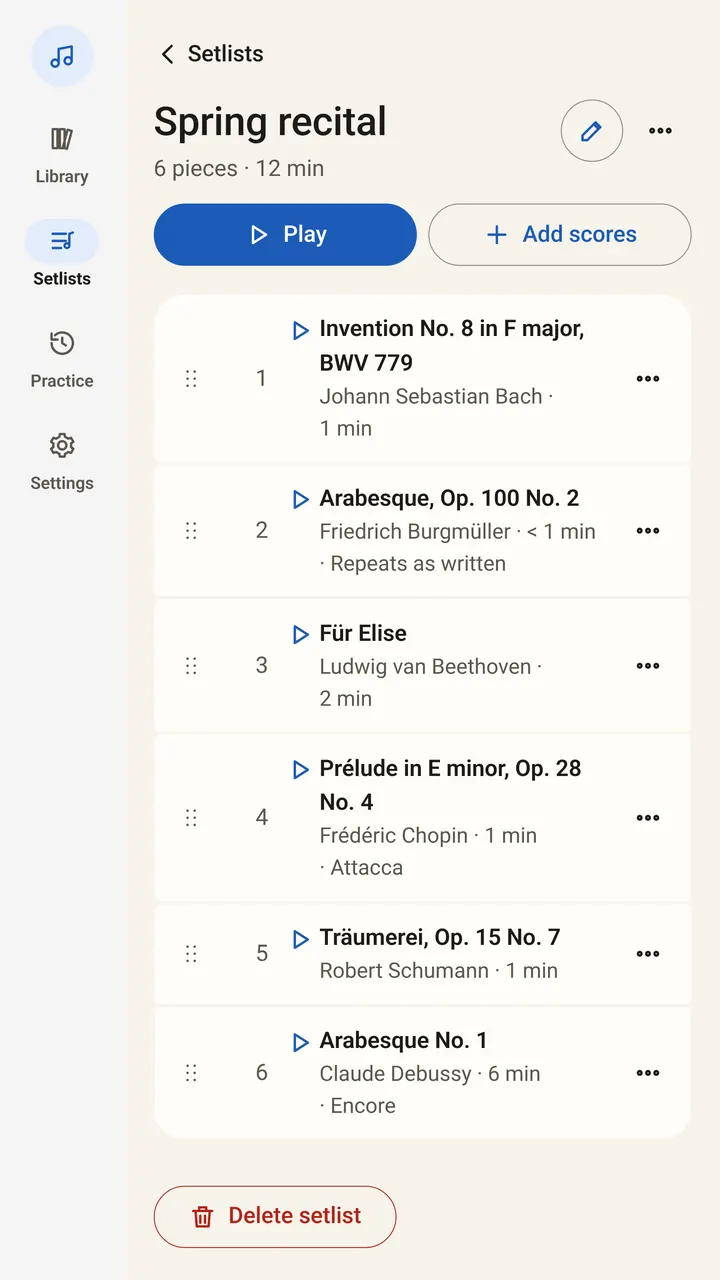
You can also start from a score. Choose Add to setlist in its menu and pick a setlist, or Or a new setlist. One score can sit in several setlists.
How do I reorder pieces and add notes?
- Reorder: use Move up and Move down next to a piece, or Alt + ↑ and Alt + ↓ on a keyboard.
- Add note: write a reminder for a piece, such as “Capo 2, skip the repeat, attacca…”. The note travels with the piece in that setlist.
- Remove: takes a piece out of the setlist.
What happens when I play a setlist?
Open the first piece. Each piece opens and listens by itself, with no extra tap. At the end of a piece, the foot line reads, for example, Turn again for the next title, or Next: and the title. After the last piece it reads End of setlist.
Keyboard shortcuts take you to the next or previous piece of a setlist. Pedals turn pages as usual.
Listening and automatic page turns are part of SheetScroll Pro. Without Pro, a setlist is still a complete, ordered reader, and you turn pages with a pedal or a tap.
How do I share or move a setlist?
- Duplicate: copies it as “Name (copy)”.
- Share as a list: copies or shares the titles in order.
- Share as PDF: makes a PDF of the list.
- Export for forScore: makes a file forScore can read.
- Delete setlist: removes the setlist.
Coming from forScore or MobileSheets? Choose Add → From another app and your setlists come across with your titles and tags. See the import help.
Are the courses setlists?
Yes. Setlists → Learn lists eight courses of public-domain pieces in teaching order, for piano, guitar, violin, cello, flute, clarinet, saxophone and trumpet. Tapping one creates an ordinary setlist, such as Learn violin, that you can rename, reorder, add to or annotate. The pieces listen and turn without Pro.
Questions
Can a score be in more than one setlist?
Yes. Adding a score to a setlist does not move it. The library says, for example, Added to 2 setlists.
Do I need Pro for setlists?
No. Setlists are in the free reader. Pro adds listening and automatic page turns.
Can I put notes on a piece?
Yes. Add note keeps a reminder with the piece in that setlist, such as a capo position or a repeat to skip.
Can I send a setlist to someone using forScore?
Yes. Export for forScore makes a file for it. Share as a list and Share as PDF are there too.
Related
- Opening music filesSheetScroll opens PDFs, photos, MusicXML, MuseScore, Guitar Pro, MIDI, ABC, chord charts and more. How to add them, and pair a scan with a digital copy.
- Writing on your musicDraw with a pen or highlighter, add fingerings, bowings and other stamps, erase and undo. Marks stay with their bars in every view.
- Automatic page turnersEvery way to turn sheet music pages hands-free, from pedals to apps that listen, with the pros and cons of each and how a listening page turner decides.
- TeachersMark up pieces, set up recitals, build a lesson library and give students practice that listens. A sheet music app for music teachers, with a free reader.