How do I loop a few bars?
- In a score, tap the page for the controls and tap Practice.
- Choose Loop, then Select bars and drag across the bars. Or choose By bar number and set From bar and to.
- Tap Loop these bars.
- Play. SheetScroll loops those bars. Clear loop goes back to the whole piece.
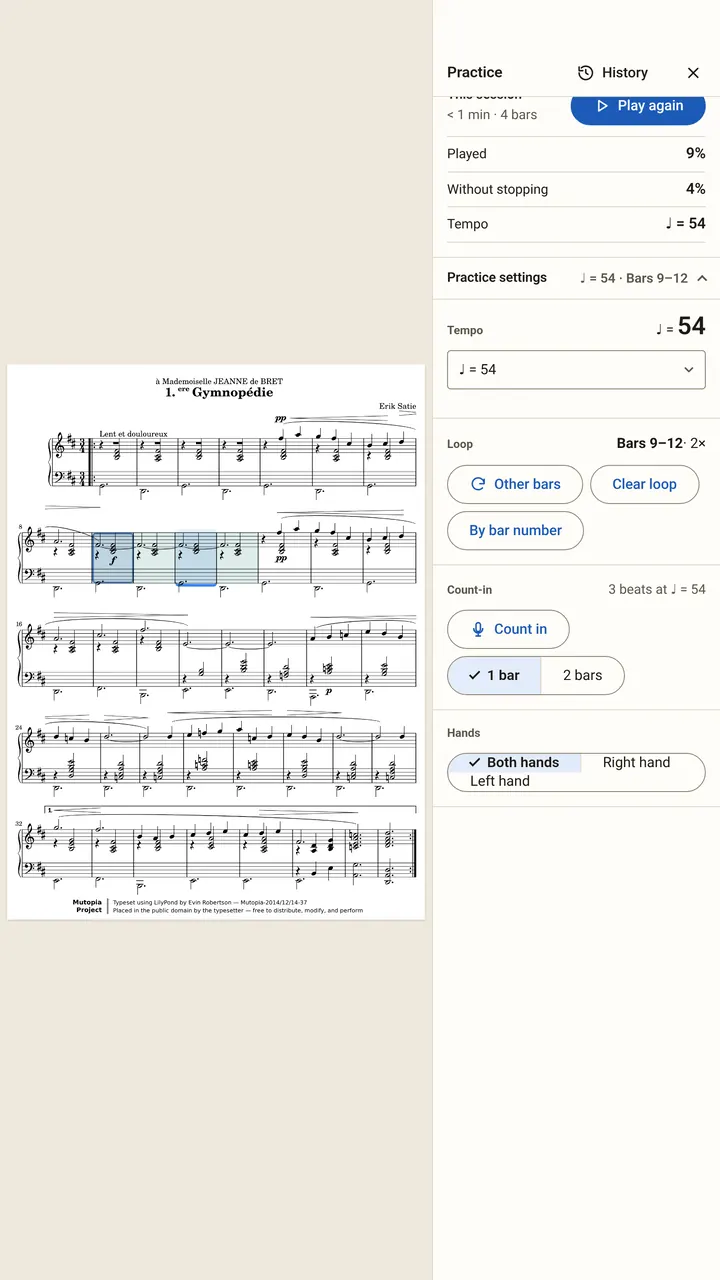
In Bars to work on, Loop slower loops a trouble spot at a lower tempo for you.
How do I set my own tempo?
In Practice settings (Tempo, loop, count-in), choose Practice tempo or Score tempo, or pick Custom… and tap Set. SheetScroll shows your tempo in beats per minute and as a percent of the marking.
Count-in has its own length and tempo. Tap Count in and SheetScroll counts the beats before you start.
Play along has Start, Volume and Timing: Follow me or Steady tempo.
How do I practice hands separately?
- Open Practice, then Hands.
- Under Hands to follow, choose Right hand, Left hand or Both hands.
- Play your hand. SheetScroll follows that hand only, and the status says what it is following.
For scores that are not two-staff piano, the choice is by staff, with Every staff as the default.
What does practice history show?
Tap History in Practice, or open Practice history in the library. SheetScroll measures practice as it listens, so a piece must be played with listening on to show up.
- Latest session: notes right, in time, in tune, played, without stopping, and dynamics.
- Progress and Practice time: minutes per day, the last 7 days and in all, with your tempo as a percent of the marking.
- Passages you looped and Bars to work on, with the reason, such as a missed note, a rushed beat or a flat note.
- Resume: Continue there starts from where you stopped last time.
Each score’s history stays with it. Deleting a score deletes its practice history.
Questions
Do practice tools need Pro?
Practice that listens, with loops and hands separately, is part of SheetScroll Pro. The free reader has every format and view, annotations, setlists and the eight courses.
Does SheetScroll record my practice?
No. It measures as it listens and keeps the results, never audio. Listening happens on your device.
Why do loops not work on my device?
On some devices loops and count-ins do not work with listening. SheetScroll tells you so.
What does SheetScroll measure?
Notes right, in time, in tune, played, without stopping, and dynamics. It shows them for your latest session and over the last 7 days.
Related
- How long to practiceHow long to practice piano, guitar or violin each day, how to practice well, and what to do when you stop improving, with the research behind it.
- Listening and the microphoneWhere to put your device, what SheetScroll hears, when it holds the page, and how tapping the bar you are on tells it where you are.
- Writing on your musicDraw with a pen or highlighter, add fingerings, bowings and other stamps, erase and undo. Marks stay with their bars in every view.
- Automatic page turnersEvery way to turn sheet music pages hands-free, from pedals to apps that listen, with the pros and cons of each and how a listening page turner decides.
- StudentsFree courses, free sheet music, loops, hands-separately practice and tempo history. A sheet music app for students that listens and turns the page.