What does a church musician need from a music stand?
Sunday is a run of short pieces with no time between them. A hymn has five verses and a repeat sign, and an anthem has a D.S. The pianist or organist turns pages with hands that are already full, and the pedals may be busy too.
The worship team has a different problem. The singers want the song in their key, the guitarist wants chords, and the keyboardist wants the same chart a half step lower, all by 9:30.
So the stand has to do three things well: hold the order of the service, show each song in the right key, and keep up through the repeats.
How does SheetScroll keep a service in order?
A setlist is the order of service. Put the prelude, the hymns, the offertory and the postlude in it, and each piece opens and listens by itself when you reach it. Setlists are free, and a tap or a Bluetooth pedal moves you on.
Pieces can be PDFs of a hymnal page, photos of a paper anthem, or a file from a notation program. SheetScroll keeps its own copy and never changes your original. Over 8,000 public-domain scores are free to get in the app.
How does it handle verses, repeats and chord charts?
- Repeats and D.S.: it follows repeat signs, first and second endings, D.S. and coda, so the page goes back when you do, not when it guesses.
- Chord charts in any key: transpose the chart, set a capo, or switch to Nashville numbers. Lyrics stay lined up with the chords.
- Never early: if two verses sound alike, it holds the page and outlines the places it is choosing between. You play on, or tap the bar.
- Pencil notes: write "3 verses, skip 4" on the music, and it stays with its bar in every view.
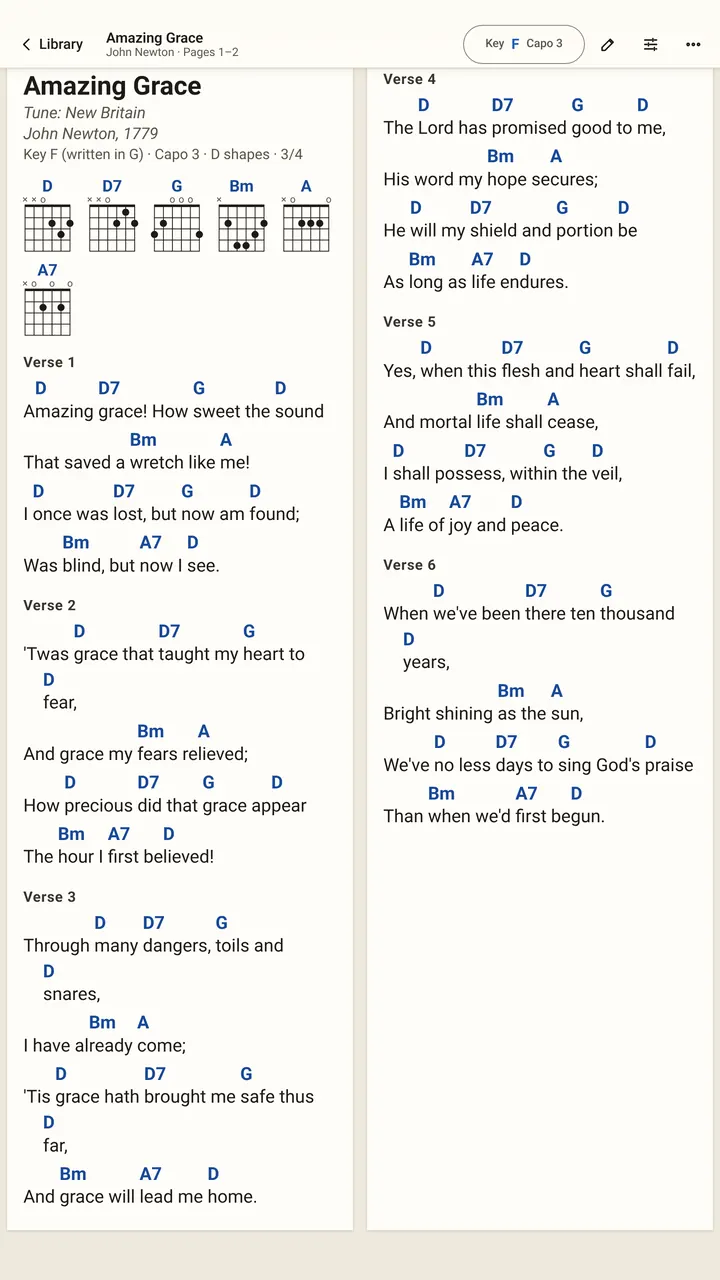
Chord charts and transposing are free. Following the repeats takes Pro.
Can the whole band turn pages together?
Yes, with Play together. One device listens and everyone else's pages turn with it over Wi-Fi. On Sunday, the keyboardist's tablet can lead and the guitarist's and the singers' devices follow.
The leader taps Lead other devices and a code appears. Everyone else taps Follow a leader and scans the code or types the short code. When SheetScroll asks, allow it to find devices on the local network.
Only bar positions are shared, and they are encrypted. Each device shows its own copy of the piece. The leading device needs Pro; the devices following it don't.
How do you set up the stand for a service?
- Organists and pianists: a tablet on the music desk, in half-page view if the pages are full. A Bluetooth pedal works if a foot is free; listening handles the rest.
- Praise bands: pick the leader the night before, and test the room's Wi-Fi at rehearsal. Everything else, including the music and the listening, runs on each device.
- Sound check: play the first bars into the mic once. If you use a digital piano or keyboard, connect it over USB or Bluetooth MIDI instead.
- Plan B: a pedal press or a tap always wins over listening, so you can turn by hand if the sanctuary gets loud.
What do church musicians get free, and what is Pro?
Free forever: the complete reader, every format, setlists, chord charts with transpose, capo and Nashville numbers, annotations, and turns by pedal or tap. Pro adds listening, automatic turns, repeats and jumps followed, and Play together. A year is $29.99 with the first 2 weeks free.
Questions
Can I put a whole Sunday service in one place?
Yes. A setlist holds the pieces in order, and each one opens and listens by itself. Setlists are free.
Does it follow a D.S. al Coda in a hymn or anthem?
Yes. It follows repeat signs, first and second endings, D.S. and coda. That is part of listening, which is Pro.
Can I change a song's key for the singers?
Yes. Chord charts can be transposed, set to a capo or shown as Nashville numbers, with the lyrics lined up. That is free.
Does the band need internet at church?
No. Importing, reading and following all run on each device. Play together needs the devices to share one Wi-Fi network.
Does it work for an organist?
SheetScroll follows keyboards, and a Bluetooth page-turn pedal works alongside listening. Tapping the bar you are on tells it where you are.
Related
- BandsPlay together: one device listens and every band member's pages turn with it over Wi-Fi. Setlists, chord charts in any key and Nashville numbers.
- Singers and choirsTurn pages while you sing or lead a choir. SheetScroll follows voice, shows chord charts and lyrics in any key, and lets a choir's pages turn together.
- PianistsA sheet music app for pianists: it listens through the mic or a digital piano over MIDI and turns the page two beats early, never early. Free reader.
- GuitaristsOpen Guitar Pro files, text tabs, PDFs and chord charts. SheetScroll listens as you play guitar and turns the page, never early. Transpose and set a capo.
- DrummersSheetScroll listens to your kit and turns the page two beats before the end, never early. It opens charts, parts and PDFs, and the reader is free.
- Repeats, D.S., D.C. and codaHow to read repeat signs, first and second endings, D.C., D.S., coda and fine in sheet music, with a worked example and how a page turner follows them.
- Bluetooth page turn pedalsHow a Bluetooth page-turn pedal works, how to pair it with iPad, Android, Windows or Mac, which mode to pick, and notes on AirTurn, PageFlip and Donner.
- Automatic page turnersEvery way to turn sheet music pages hands-free, from pedals to apps that listen, with the pros and cons of each and how a listening page turner decides.
- Opening music filesSheetScroll opens PDFs, photos, MusicXML, MuseScore, Guitar Pro, MIDI, ABC, chord charts and more. How to add them, and pair a scan with a digital copy.
- Page turning appsSheet music apps that turn pages by listening (SheetScroll, Newzik, Smartleggio) or by face and eye gestures (forScore, MobileSheets, SightTune).